
What the combat log reader counts
The columns of the Consumables tab, with examples. Recognition works by spell ID; the names in the report come from the log.
| Column | What is counted | Examples |
|---|---|---|
| Flask | active on pull, uptime in the fight | Flask of the Titans, Flask of Distilled Wisdom, Flask of Supreme Power, Flask of Chromatic Resistance |
| Battle elixir | active on pull, uptime in the fight | Elixir of the Mongoose, Elixir of the Giants, Greater Firepower, Shadow Power |
| Guardian elixir | active on pull, uptime in the fight | Mageblood |
| Food | active on pull, uptime in the fight | Well Fed (Strength), Well Fed (mana regeneration), Well Fed (Agility), Well Fed (Intellect) |
| Protection potion | active on pull, uptime in the fight | Greater Fire Protection Potion, Greater Frost Protection Potion, Greater Nature Protection Potion, Greater Shadow Protection Potion |
| Zanza/Juju/BL | active on pull, uptime in the fight | Spirit of Zanza, Swiftness of Zanza, Sheen of Zanza, Juju Power |
| Oil/stone | temporary weapon enchant on pull | weapon oils, sharpening stones, poisons |
| World buffs | number active on pull | → world buff check |
| DM tribute | number active on pull | → world buff check |
| Healing potion | uses in the fight | Major Healing Potion |
| Mana potion | uses in the fight | Major Mana Potion |
| Healthstone | uses in the fight | Major/Greater Healthstone |
| Demonic/Dark Rune | uses in the fight | Demonic/Dark Rune |
How to read the table
In the combat log reader every player has one sign per column: ✓ means active on pull (a small number next to it is the uptime in percent if it is below 100), late means taken during the fight, ✗ means missing and – means not used. Potions, stones and runes show the number of uses in the fight. The Missing only button hides everyone who has nothing missing.
For the whole log, potions, stones and runes add up over all fights including trash; for flasks and other auras it counts whether they were active at some point. So to answer “prepared for the boss?”, pick a boss fight.
In a Warcraft Logs report
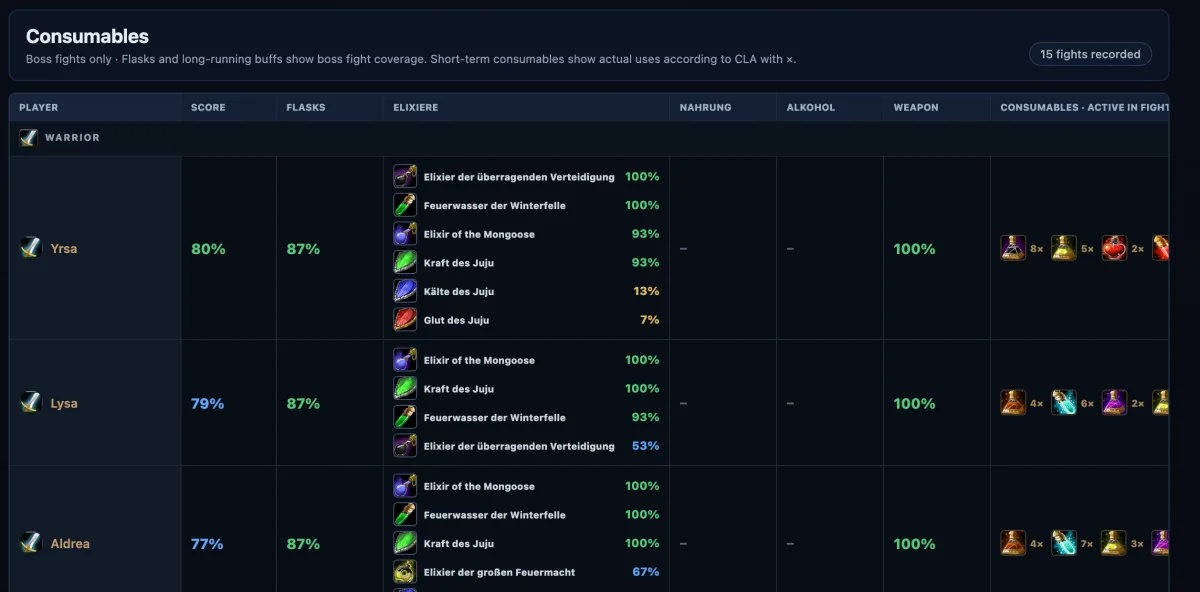
For Warcraft Logs reports the log analysis has its own Consumables view. It only counts boss fights: flasks and long-running buffs show what share of the boss fights they covered, short consumables the number of uses.
Tips for raid leaders
- Decide beforehand what you expect – for example flask and food on every boss, protection potions only on certain bosses. The log analysis measures; it does not judge.
- For protection potions, only compare fights where you actually called for them. How much damage a potion absorbed is listed in the combat log reader under General → Absorbs.
- If everything is missing for a player, they may have been out of the logger’s range. “no gear data” means nothing about them was in the log at the pull.
- The CSV consumables and CSV like the RPB sheet buttons export the values for your own spreadsheet.
How to analyze your log
Option 1: Warcraft Logs report
- Type
/combatlogin chat before the first pull and upload the raid with the Warcraft Logs uploader afterwards. Keep the report public. - Paste the report link (…warcraftlogs.com/reports/…) into the log analysis and press “Analyze”.
- The first analysis takes one to three minutes. Then you get a short link for your Discord.
Option 2: combat log file in the browser
- Type
/combatlogbefore the first pull. For more detail, turn on “Advanced Combat Logging” in the system options under Network. - After the raid, open the combat log reader, press “Choose combat log file” and pick
WoWCombatLog.txtfrom theLogsfolder (Classic Era:_classic_era_\Logs). - The file is not uploaded. Large logs of several hundred MB take one to two minutes. You can save the report as a file or share it as a link.